
The AI Safe-Use Card
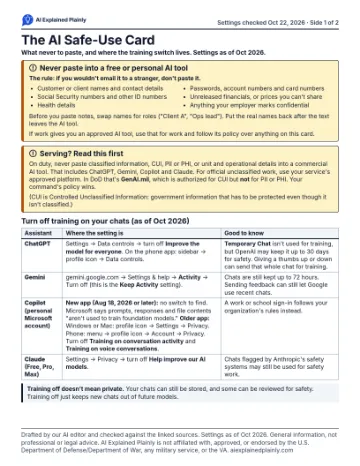
This is the one page we'd tape next to your monitor. It covers what never to paste into an AI tool, and where the switch that lets the company train on your chats lives in ChatGPT, Gemini, Copilot and Claude. The settings are as of October 2026, and each one links to the vendor's own help page.
The printable version adds 8 copy-paste work prompts on the back. It's free when you sign up for the newsletter and confirm your email.
Get the printable card, with 8 copy-paste prompts
It's free when you confirm your email. The first issue lands Tue Oct 27, 7 AM CT.
You'll get a confirmation email first, so check your inbox. Kit sends the newsletter for us, and your email isn't used for anything else. Here's our privacy policy.Never paste into a free or personal AI tool
The rule: if you wouldn't email it to a stranger, don't paste it.
- Customer or client names and contact details
- Social Security numbers and other ID numbers
- Health details
- Passwords, account numbers and card numbers
- Unreleased financials, or prices you can't share
- Anything your employer marks confidential
Before you paste notes, swap names for roles ("Client A", "Ops lead"). Put the real names back after the text leaves the AI tool.
If work gives you an approved AI tool, use that for work and follow its policy over anything on this card.
Serving? Read this first
On duty, never paste classified information, CUI, PII or PHI, or unit and operational details into a commercial AI tool. That includes ChatGPT, Gemini, Copilot and Claude. For official unclassified work, use your service's approved platform. In DoD that's GenAI.mil, which is authorized for CUI but not for PII or PHI. Your command's policy wins.
(CUI is Controlled Unclassified Information: government information that has to be protected even though it isn't classified.)
Turn off training on your chats (as of Oct 2026)
| Assistant | Where the setting is | Good to know |
|---|---|---|
| ChatGPT | Settings → Data controls → turn off Improve the model for everyone. On the phone app: sidebar → profile icon → Data controls. | Temporary Chat isn't used for training, but OpenAI may keep it up to 30 days for safety. Giving a thumbs up or down can send that whole chat for training. |
| Gemini | gemini.google.com → Settings & help → Activity → Turn off (this is the Keep Activity setting). | Chats are still kept up to 72 hours. Sending feedback can still let Google use recent chats. |
| Copilot (personal Microsoft account) | New app (Aug 18, 2026 or later): no switch to find. Microsoft says prompts, responses and file contents "aren't used to train foundation models." Older app: Windows or Mac: profile icon → Settings → Privacy. Phone: menu → profile icon → Account → Privacy. Turn off Training on conversation activity and Training on voice conversations. | A work or school sign-in follows your organization's rules instead. |
| Claude (Free, Pro, Max) | Settings → Privacy → turn off Help improve our AI models. | Chats flagged by Anthropic's safety systems may still be used for safety work. |
Training off doesn't mean private. Your chats can still be stored, and some can be reviewed for safety. Training off just keeps new chats out of future models.
Sources
Checked Oct 22, 2026, on each vendor's own help page.
- ChatGPT: Settings → Data controls → Improve the model for everyone; mobile path: OpenAI Help: Data controls in ChatGPT
- ChatGPT: thumbs up/down can send the chat for training: OpenAI Help: Data controls in ChatGPT, FAQ
- ChatGPT: Temporary Chat not used for training, kept up to 30 days: OpenAI Help: Temporary chat
- Gemini: Settings & help → Activity → Turn off: Google: Manage & delete your activity in Gemini Apps
- Gemini: Keep Activity off = not used for training unless you send feedback: Gemini Apps Privacy Hub (last updated Oct 19, 2026)
- Copilot new app (Aug 18, 2026): not used to train foundation models: Microsoft: Copilot for individuals, your activity history
- Copilot new app: privacy controls list has no training toggle: Microsoft: your privacy controls and choices
- Copilot older app: training switches and paths: Microsoft: Copilot privacy controls (older app)
- Claude: Settings → Privacy → Help improve our AI models; flagged chats: Anthropic Privacy Center (dated Aug 3, 2026)
- GenAI.mil: authorized for CUI, not PII/PHI: DON CIO memo
- Never-paste list and service-member note: our own published pages, Issue #1, Can I use ChatGPT in the military?
Drafted by our AI editor and checked against the linked sources. General information, not professional or legal advice.